Use a Portal Site to Make SharePoint Easy!
Smart Start for SharePoint Online
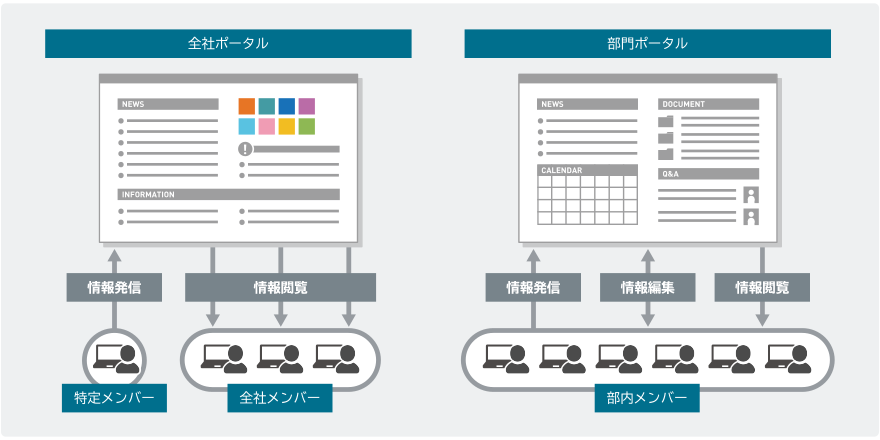
This service narrows down the use of SharePoint to a portal. It is aimed at customers who are hesitant to implement SharePoint because there is so much it can be used for, but they don’t know how best to proceed. Sorting through the necessary functions and adopting a designed site template, you can start using SharePoint in a short time.
Service Overview
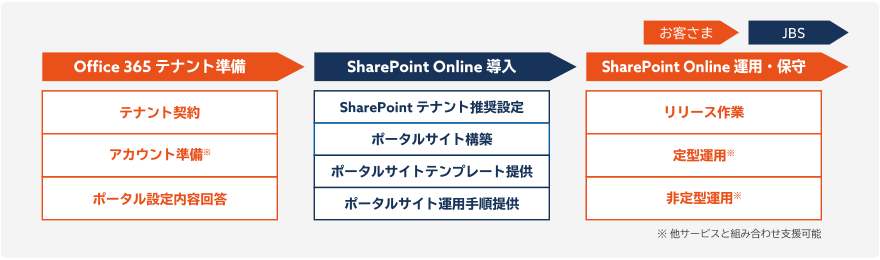
JBS offers a SharePoint Online package that includes tenant building, portal site creation, and portal site operation steps.
We can complete an original design for each customer by having you answer a simple assessment sheet and you will be able to start using it in as soon as ten business days after answering.
Service Merits
By implementing the portal site and operation method, designed based on JBS’s building track record developed over many years, you will be able to use the service immediately.
- Minimizes Your Workload
-
You will be able to use the service immediately by providing answers about the items (name of site and icons) that need to be decided when creating the site.

- Provision of a Site Design Based on JBS’s Performance and Knowledge
-
Because we provide a portal site designed based on our knowledge and operation method in accordance with the site, you will be able to use it with ease.

- Implementation Realized in as Soon as Ten Business Days
-
By packaging the SharePoint design and building, which tend to be difficult to understand and complex, you will be able to start using it in as soon as ten business days.

Service Details
We remotely access your Office 365 tenants and set up the SharePoint tenants as well as build the SharePoint site before handing it over. After the handover is complete, you will be able to use the site simply by implementing the release work such as sending user announcements and other in-house notifications and registering the initial data.
Site Template Concept
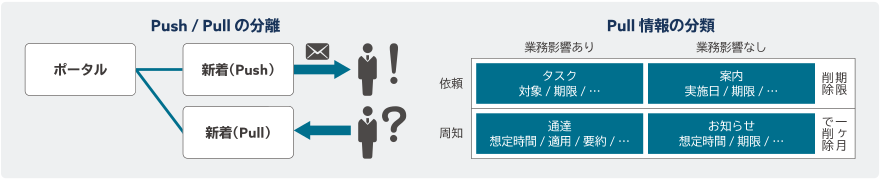
With data storage that clearly separates information push and pull and by categorizing push information, we have realized a portal that adopts an UI that makes it easy to see users’ perspective.
Prerequisite Conditions
Office 365 tenants have already been established- Tenant contracts have been concluded
- You have a SharePoint license
- Connections can be made from JBS’s network through HTTPS communication
- A user with SharePoint administrator access is loaned
- A user for operation confirmation is loaned
- Sharing is only among users within the organization
- Changes to the default value at the time of site creation
- Changes to the storage default value
Options
In order to respond to the wishes of customers that cannot be fulfilled by the provision of a portal alone, we have prepared various options.
- External sharing settings
Support function design and operation design for a function to invite users from outside your company to share information. - Department portal template development
Creation of sites on your behalf when launching as many department-specific sites as are required at your company - Support for designing individual authority for the company-wide
portal
Support the preparation of authority patterns other than those designed in the template and for designing and installation of functions related to authority control automation - Additional site functions
Function design and installation support related to additional functions not in the template - OneDrive operation design support
Operation design support related to synchronized client use and OneDrive inventory
- Related Tag
- Related Partner
-


 Share
Share