Automate Your System Operations and Cut Costs Efficiently!
Optimization Tool COScA for Microsoft Azure
This service automates operational tasks for systems built on Microsoft Azure (hereafter, “Azure”). With simple GUI-based configuration, it enables cost optimization without requiring time-consuming effort or manual work. By adjusting the running hours of Azure resources, you can achieve effective cost savings.
What Is FinOps?
FinOps is a method for optimizing financial operations in a cloud environment, enabling greater visibility, management, and efficiency of cloud spending. It aims to maximize the ROI of cloud investment by fostering collaboration among IT, finance, and business teams, and by improving the visibility, analysis, and optimization of cloud costs.
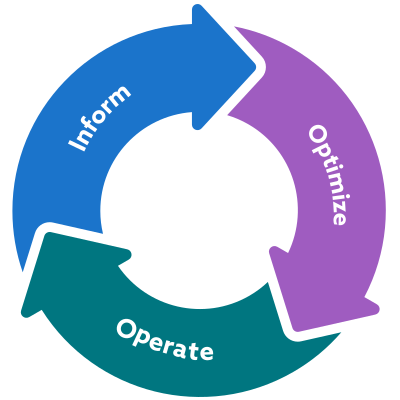
Inform(Visualization)
Visualize and understand costs and their structure.Optimize(Optimization)
Identify optimization opportunities and set improvement targets.Operate(Execution)
Develop and implement measures to achieve those targets.Service Overview
JBS offers two services that complement or replace standard Azure features.
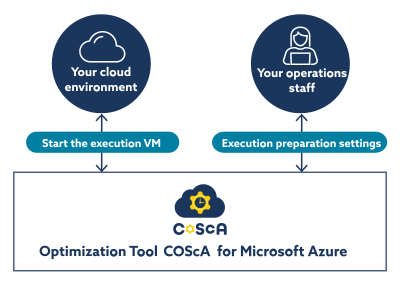
The optimization tool COScA for Microsoft Azure (hereafter, “COScA”) is a service that enables cost optimization by automating operational tasks for systems built on Azure.
Service Benefits
Operational tasks such as adjusting running hours or resizing Azure resources can be automated in a short time through simple configuration.
- Automate Operational Tasks
-
Tasks such as starting, stopping, or resizing Azure resources can be executed automatically at the required times for your work. With a built-in work calendar, the service supports flexible scheduling.

- Easy to Configure and Execute
-
You can configure settings through a simple and intuitive interface. In exceptional cases, tasks can also be executed manually, minimizing the risk of errors and ensuring safe operation.

- Quick and Easy to Deploy
-
With built features for team management, task execution, and error notifications, you can start using the service in a short time and quickly achieve cost-saving results.

Service Details
COScA, which automates Azure operational tasks, offers significant benefits when you want to easily automate specific operations.
Team Management
Create teams and restrict the scope of user operations.
Job Execution Management
Create, update, delete, or disable jobs, and view execution results in the history.
Notifications
Receive email alerts when errors occur during job execution, etc.
Immediate Execution
Execute tasks immediately as needed.
Scheduled Execution
Execute tasks at specific dates and times, or on a recurring schedule (daily, on specific days, weekly, or monthly).
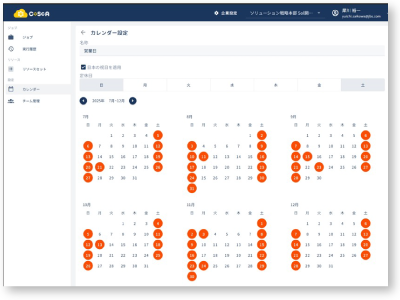
Calendar
In addition to the standard calendar that includes Japanese public holidays, you can configure your own custom calendars.
Azure Resource Operations
Perform various operations on Azure resources.
- Start, stop, and resize virtual machines.
- Change App Service Pan tiers.
- Start and stop Application Gateways.
Sequential Execution
Execute multiple processes in sequence, such as stopping one VM and then starting another.
Continue Execution on Error
Even if an error occurs in one process, subsequent processes can continue without interruption.
Implementation Flow
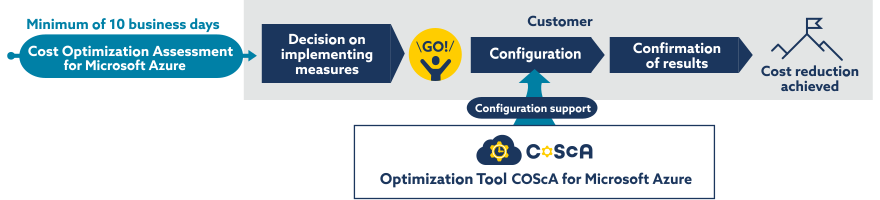
After reviewing your Azure usage and determining what to automate, you can configure the settings using the COScA interface. JBS can also provide support during the setup process, enabling you to begin using the service with confidence.
JBS also offers a service to assess your current Azure usage, which can be used together with this service.
Q&A
- Can COScA be used without the Cost Optimization Assessment for Microsoft Azure?
- COScA can be used independently. However, if the automation requirements are not yet clear, using Cost Optimization Assessment for Microsoft Azure lets you receive proposed measures as recommendations.
- What is the minimum usage period?
- The minimum usage period is one year.
- What is the difference from Azure Automation?
- Azure Automation is a highly versatile automation platform that can automatically execute a wide range of processes by implementing PowerShell scripts. On the other hand, COScA lets you automate operations for specific Azure resources directly through its interface, without writing scripts, configuring detailed schedules, or implementing monitoring.
- Related Tag
 Share
Share