Choose Mac for Your Enterprise IT
Mac Deployment Starter Pack for Businesses
With JBS-recommended settings, you can deploy Mac quickly and cost-effectively. We provide a one-stop solution for setting up everything needed for business use, enabling you to get started with Mac smoothly.
Service Overview
The Mac Deployment Starter Pack for Businesses enables you to quickly and affordably deploy Mac using recommended settings based on JBS’s extensive track record. It allows you to start using Mac immediately for production or proof-of-concept (PoC) purposes. The pack provides the essential settings required for initial deployment in a streamlined, minimal configuration, helping ensure a smooth rollout.
-
-
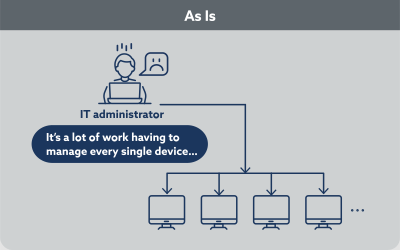
- The IT administrator has to set up each device manually one by one.
- Security settings differ across devices.
- The existing Microsoft 365 environment is not being fully leveraged.
-
-
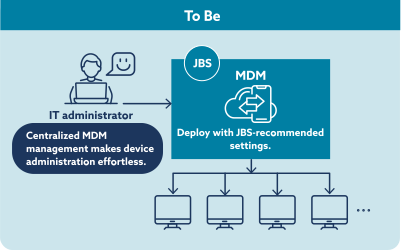
- Zero-touch provisioning significantly reduces deployment and setup time.
- Rapidly provide a mobile device management (MDM) environment to manage Mac devices centrally.
- JBS-recommended settings help you maximize your existing Microsoft 365 environment while enhancing security.
Service Benefits
We help organizations smoothly deploy Mac devices by addressing the operational, security, and standardization challenges that commonly arise during Mac adoption, from initial design through deployment.
- Reduce the Burden on Your IT Department
-
Reduce the time and effort required to manually set up individual Mac devices, streamlining device provisioning and ongoing management. This enables your IT department to focus on their core responsibilities.

- Strengthen Security
-
Implement JBS-recommended security settings, including encryption, SSO, and Conditional Access, to reduce the risks associated with unmanaged or non-compliant Mac devices and establish a well-controlled operating environment.

- Flexible MDM Options
-
Based on your requirements and existing licenses, we select and design the optimal MDM solution using either Microsoft Intune or Jamf Pro. By implementing MDM, you can centrally manage Mac settings, streamline operations, and ensure consistent management across all devices.

Service Details
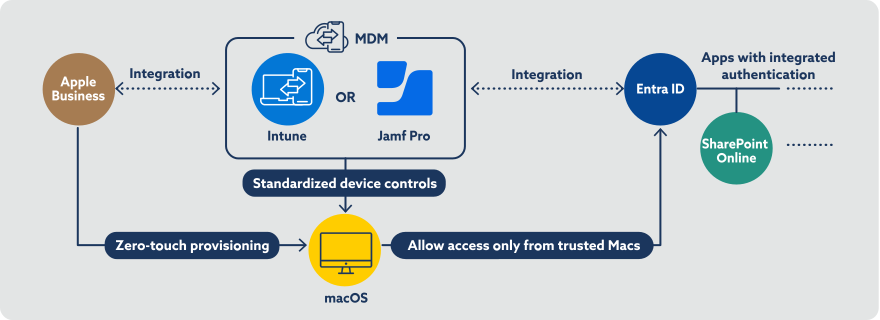
Based on integration between Apple Business, MDM solutions such as Microsoft Intune and Jamf, and Microsoft services, JBS applies standardized configurations based on its expertise and supports the entire process from zero-touch provisioning through to the start of operations.
-
Configuration Details
Password policy
Wi-Fi profile configuration
Disk encryption
Update deployment
App deployment (up to 3 apps)
Platform SSO (PSSO) configuration
Compliance policies
Conditional Access (up to 1 configuration)
Zero-touch provisioning
Feature restriction policies (up to 3 policies)
-
Scope of Services
Review of the existing environment
Design, configuration, and testing of the MDM environment based on JBS-recommended settings
Administrator training on MDM operation and managementDeliverables
Parameter sheet
Test item listImplementation Period
Two months
Q&A
- How many devices do we need to get started? Can existing Macs also be included?
- The service can be used with as few as one device. You can start with a limited rollout, such as a specific department or a proof of concept (PoC). It can also be applied to existing Macs, not just newly deployed devices. Based on your current environment, we support a phased rollout tailored to your needs.(※)
- Can you also handle the procurement of the Mac devices?
- Mac device purchases are not included in this service, but procurement can be arranged separately upon request. JBS can provide end-to-end support, from selecting Mac models through procurement, together with the implementation service.
- Depending on the MDM product selected, a minimum number of licenses may be required. We provide individual guidance on the optimal configuration based on the number of devices to be deployed.
- Related Partner
-

 Share
Share