Double-Checking by Humans Is Over. Prevent Mis-Sending of Emails with AI.
fiebie Check
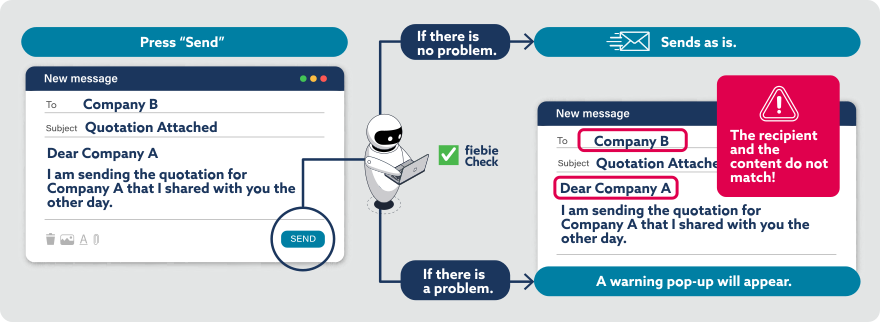
When sending emails from Microsoft Outlook, AI assesses the risk and prevents mis-sending. Because the AI will review the entire email content, it can also detect risks that cannot be detected through keyword-based rules alone.
Service Overview
fiebie Check is a SaaS service used in connection with Microsoft 365.
At the point at which you click the send button in Microsoft Outlook (hereinafter, “Outlook”), the AI will analyze the content of the email and send it if there are no problems, or warn you with a pop-up if there is a problem. It works with both the classic Outlook and the new Outlook. It can also be used with the web-version of Outlook.
Service Benefits
Safe emails are sent out without requiring confirmation, therefore avoiding negative impact on users’ productivity. The AI understands the email content without any need for pre-registered keywords or rule management, and only alerts users when necessary.
- Detection with AI
-
Because the AI reads and evaluates the full email, it can detect issues that are undetectable through keyword-based rules alone.

- Safe Emails Are Sent Immediately
-
Only emails with potential risks trigger a warning, while safe emails are sent without confirmation. Because of this, it doesn’t interrupt your workflow.

- Visualize Usage
-
User responses to warnings are logged, allowing you to track when warnings are ignored and leverage that data for training and procedural improvement.

Service Details
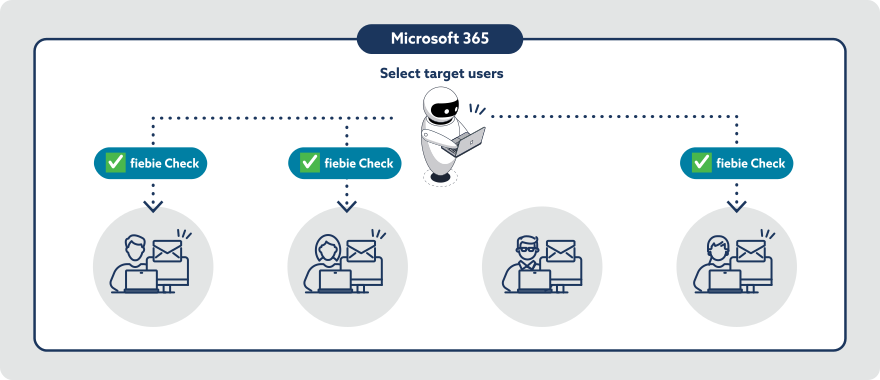
Register the service in the Microsoft 365 admin center and select the target users. The service will then run in Outlook for those users, so there is no need to install any modules on individual PCs.
No prior configuration of the Microsoft 365 environment is required on the customer side. JBS will handle the necessary setup during the contracting process, enabling you to start using the service immediately after the contract is finalized. You can also choose to apply the service to selected users only, rather than the entire organization, helping reduce overall costs.
Q&A
- What versions of Outlook are supported?
- The service supports both the new and classic versions of Outlook for Windows, as well as the web-version of Outlook.
- Can it be used by only some users in an organization?
- Yes, you can limit usage to selected users only.
- Do users need to install software on their devices?
- No software installation is required. The service can be enabled via the Microsoft 365 admin center.
- If a user uses multiple devices, are additional licenses required?
- No additional licenses are needed. Since the service is assigned per user via the Microsoft 365 admin center, it can automatically be used across multiple devices.
- Can it be used with shared mailboxes?
- Yes, as long as the sender is a licensed user and sends emails using SendAs permissions.
- Does it support multiple languages?
- The product UI is available only in Japanese. While detection supports emails in languages other than Japanese, it is primarily designed for Japanese emails, so detection accuracy may be lower for other languages.
- Will our email content be used to train the AI?
- No, your data is not used for training purposes.
- What AI model is used?
- An OpenAI LLM deployed on Azure OpenAI within the JBS environment.
- Can I use fiebie Check without using fiebie?
- Yes, fiebie Check can be used as a standalone service.
- Related Tag
- Related Partner
-

 Share
Share