Build a PoC Environment that Supports Sales Activities and Customer Support Work in a Short Time!
PoC Environment Building Service for Dynamics 365
JBS builds a structure to visualize issues in your work processes and make improvements with its extensive experience in implementing Dynamics 365 sales support systems and customer support systems. This is a service that you can use to consider the implementation of work applications and advance verification before creating plans.
Service Overview
We build a Dynamics 365 PoC environment as a structure to visualize issues in your work processes and make improvements to them.
Suitable for the following customers
- We are considering the implementation or review of a system to support sales activities or customer support work.
- We are considering the full-blown implementation of Dynamics 365, but are concerned about the implementation effect.
- We want to visualize issues in our current work processes.
- We want to gather material for considering our future direction or plan creation from an image of how each work process should be.
Service Benefits
- Visualization of issues in work processes
-

- Specific and highly precise verification
-

- Experience of a real implementation effect in a real environment
-

- Assessment report for issue resolution
-

Service Flow

STEP 1 Visualization of Target Work Processes
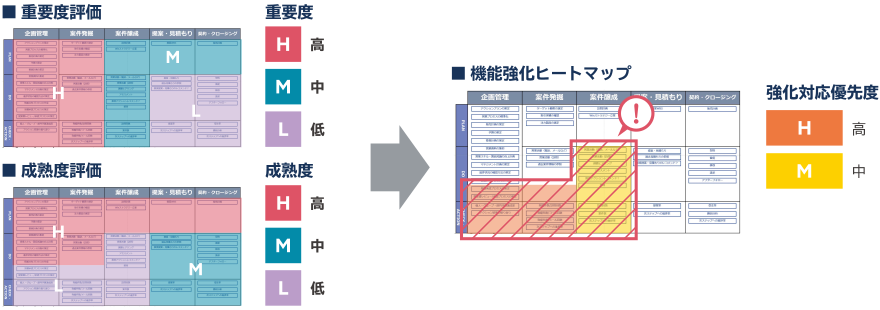
For work at customer companies, we take an inventory from the viewpoints of the degree of importance and
maturity, extract issues, and draw out a hypothesis for opportunities for improvement through IT.
Using an original sales work framework and support work framework developed by JBS that have a panoramic
view of work processes, we assess your various work processes. The results are used to visualize work
processes in which there are latent issues to be resolved as a function enhancement heat map.
STEP 2 Building a PoC Environment
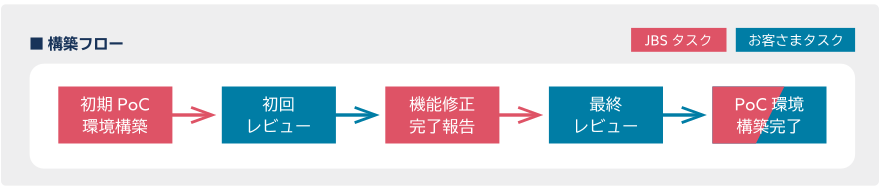
Based on the function enhancement heat map created in STEP 1, next we define the requirements of the necessary IT functions and design and customize a PoC environment. Checking the degree of compatibility with your work using a real environment, you can experience the implementation effect.
STEP 3 Assessment of the PoC Environment
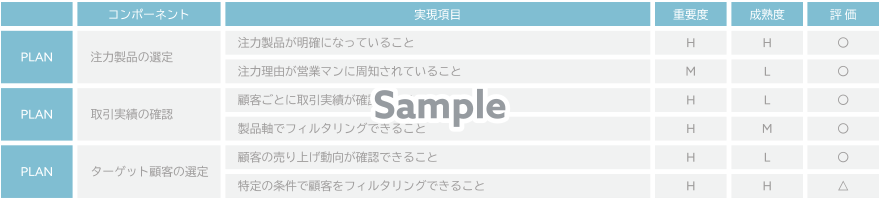
We verify whether the functions mounted in the PoC environment have reached the verification standards in line with the actual work flow. We anticipate that you will continue to utilize the environment for considering subsequent phases, but it can also be used as a production environment.
Goal
You are able to select target customers from focus products, past transaction records, etc., and make plans
to conduct efficient sales activities.
- Related Tag
- Related Partner
-

 Share
Share