Turn the Value Included in Your Microsoft 365 License into Ready-to-Use Solutions.
Microsoft Intune Suite Implementation Support
We accelerate deployment of Microsoft Intune Suite, which is available through your existing Microsoft 365 E3 or E5 licenses, by leveraging standardized design methodologies based on our extensive implementation track record. We minimize risks while ensuring design quality, providing end-to-end support through to operational launch, including the delivery of manuals and hands-on training.
Service Overview
This implementation service is designed for customers who already have Microsoft 365 E3 or E5 licenses, enabling them to quickly deploy and start using three key features of Microsoft Intune Suite (hereinafter, “Intune Suite”) based on JBS’s standardized design. For customers who want to explore the capabilities of Intune Suite before making a full commitment, we offer a packaged solution that can be deployed and ready for use in as little as one month.
Three Key Features of Microsoft Intune Suite
- Microsoft 365 E3
- Remote Help
- Provides cloud-based remote support functions.

- Microsoft 365 E5
- Cloud PKI
- Enables Microsoft Intune itself to act as the root certificate authority (CA) for certificate issuance and management.

- Microsoft 365 E5
- Endpoint Privilege Management
- Provides temporary privilege elevation for tasks such as application installation.

Five Additional Intune Suite Features (Included in Microsoft 365 E3/E5)
Microsoft 365 E3
- Advanced Analytics
-
Uses AI and machine learning to analyze trends, such as battery degradation.

- Microsoft Tunnel
-
Per-App VPN for BYOD Devices

- Firmware Updates
-
Provides firmware update capabilities for Zebra devices.

- Specialized Device Management
-
Enables the management of specialized devices, such as VR headsets, AR glasses, and conference room devices.

Microsoft 365 E5
- Enterprise App Management
- Enables simple app deployment from Microsoft's application catalog.

Service Benefits
We help you quickly address needs such as “We want to try Intune Suite features,” “We want to start use right away,” and “We’re not sure which features are right for us.”
- Proven Design
-
By leveraging design procedures developed based on our previous implementation experience, we ensure design quality and reduce deployment risks.

- Ready to Use Quickly
-
With the necessary preparations completed in advance, configuration and testing can be completed in as little as one month, allowing you to start using the included new features right away.

- Reliable Operational Support
-
Start operating with confidence thanks to the provision of general-purpose operation manuals and training sessions (one or two one hour sessions).

Service Menu
We offer three implementation packages, enabling you to select the individual features you want and get started on a small scale based on your specific needs and challenges.
- Remote Help
Cloud-based remote support -
- Configuration and deployment of the relevant application
- Enablement of remote support functions
- Provision of a user guide
- Training on how to use the service
-
Recommended for organizations looking to:
-
- Replace Microsoft Teams screen sharing or third-party remote support functions
- Troubleshoot PC issues for remote workers without requiring them to come into the office
- Improve the efficiency of supporting remote locations, such as factories and retail stores
- Endpoint Privilege Management
Management of temporary privilege elevation (EPM) -
- Creation of policies to modify local administrator privileges
- Configuration of EPM policies
- Provision of a parameter sheet
- Functional testing on test devices
- Provision of operation manuals and user training
-
Recommended for organizations looking to:
-
- Enhance security by removing administrator privileges and implementing appropriate privilege management
- Reduce costs associated with third-party products
- Balance the removal of elevated privileges with user convenience
- Cloud PKI
Distribution of certificates (root and personal) -
- Creation of a root CA and issuing CA
- Provision of a parameter sheet
- Configuration of root CA certificate deployment
- Configuration of SCEP certificate deployment
- Verification of certificate deployment
-
Recommended for organizations looking to:
-
- Migrate from an on-premises certificate authority
- Implement certificate-based authentication for wireless access points (APs)
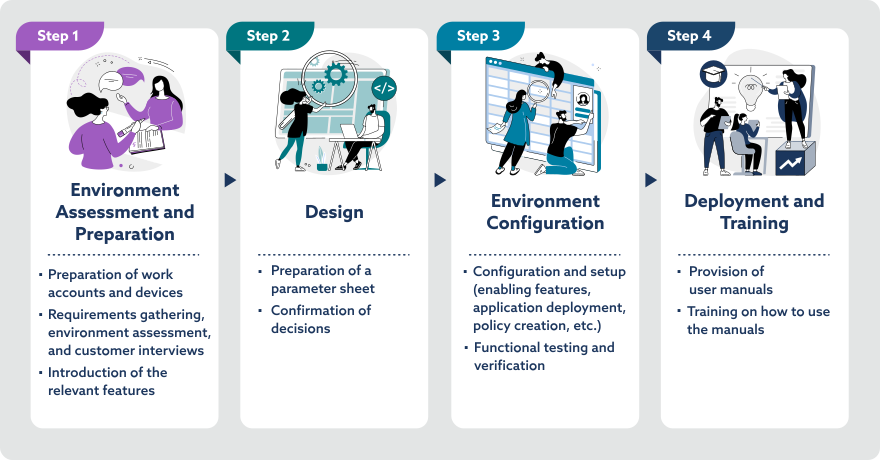
Implementation Flow
Q&A
- Can I use this service without Microsoft Intune already deployed?
- Deployment of Microsoft Intune is a prerequisite for this service. If Microsoft Intune has not yet been deployed or rolled out, we can also propose support for its implementation and rollout.
- Which operating systems are supported?
- This service currently supports Windows devices only. For other operating systems, a separate quotation will be provided.
- Can the design be customized?
- We discuss your requirements and determine whether customization can be accommodated.
- Does the deployment include rollout to the production environment?
- Application deployment is limited to test groups. Customers are responsible for rolling out the configuration to appropriate production groups.
- Can you propose other Intune Suite features beyond those included in this service?
- We first assess your requirements through discussions and then determine whether we can make additional proposals.
- Related Tag
- Related Partner
-

 Share
