Maximize the Introductory Effect of Microsoft 365 Copilot in In-House Communications!
Community Support for Microsoft 365 Copilot
A dedicated team at JBS supports your Microsoft 365 Copilot usage issues, such as increased inquiries from in-house users about the introduction of Microsoft 365 Copilot and challenges in promoting usage of Copilot. Encouraging users’ self-directed problem solving leads to improved productivity throughout the entire organization.
Service Overview
This service supports you in maximizing the effects of Microsoft 365 Copilot (hereinafter, “Copilot”) through inquiry response handling, information dissemination, and sessions, etc. By setting up an exclusive community on your Microsoft Teams, we respond to daily questions and inquiries related to Copilot. We disseminate work tips that you can use immediately and the latest updates, and host regular sessions on practical ways to use Copilot. We encourage the use of Copilot by users through such activities, and supporting the accumulation of knowledge and vitalization of the community helps to promotes the improvement of Copilot usage and retention of knowledge, leading to improved skills and usage levels throughout the organization.
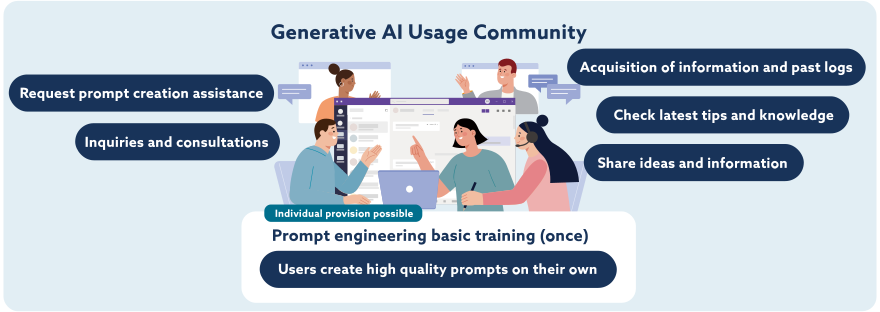
Service Benefits
By minimizing the burden on your IT staff, and combining the three main initiatives to accelerate in-house Copilot usage, this service maximizes the introductory effect of Copilot and contributes to improved productivity for the organization.
- User Support by a Dedicated Team
-
A dedicated JBS team responds swiftly to user questions about Copilot, so that your IT staff can concentrate on their main responsibilities, reducing the burden of responding to inquiries.

- Dissemination of the Latest Updates and Usage Methods
-
We regularly disseminate work tips that can be put to use immediately, as well as the latest updates. By providing opportunities to encourage use we maintain the interest of users and encourage improve Copilot usage rates.

- Various Measures to Encorage Copilot Usage
-
We encourage the retention of knowledge through various measures, such as regular sessions and usage information sharing. This invigorates interaction between users and fosters a corporate culture in which success stories are shared throughout the organization.

Service Details
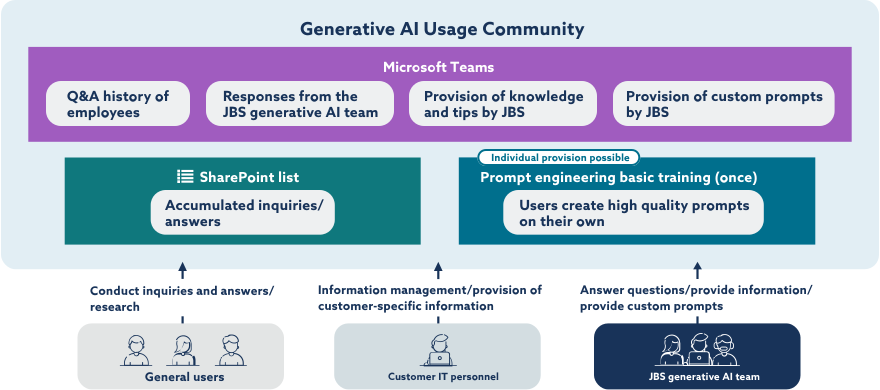
This service supports the operation of an exclusive community set up on your Microsoft Teams. Not only will it accumulate knowledge through questions and answers within the community, it will encourage users’ self-directed learning and growth through regular information dissemination and sessions. Ultimately the aim is to develop a self-sustaining community in which users teach and help each other to learn, continuously improving Copilot usage within the organization as a whole.
Schedule Image
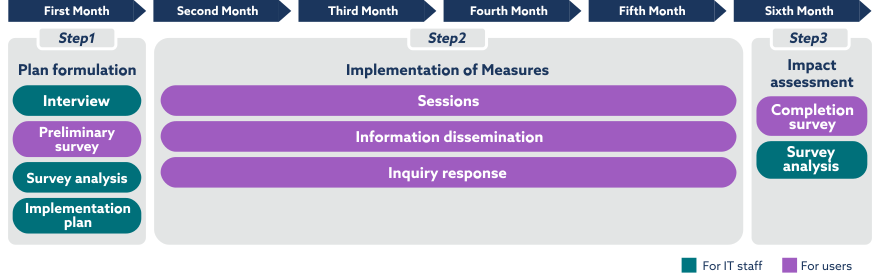
*Measures provided differ depending on the plan.
Frequently Asked Questions
- What is the scope of this service?
- It mainly focuses on responding to inquiries regarding the use of the Copilot app, but it also includes Copilot Studio Lite and SharePoint agents. Please note that Copilot Studio is not included.
- How is the community set up?
- We will set up a community exclusive to your organization on your Microsoft Teams, and promote information-sharing between participants and the accumulation of knowledge. The operational guidelines and procedures will be established in the first month of your contract.
- We do not use Microsoft Teams. Do you also support communities on other platforms?
- In some cases, we provide support through platforms such as Microsoft Viva Engage. Please contact us for more details.
- We are concerned that there might not be much interaction—such as consultations and responses—among users at the start of the community operations.
- Rest assured that JBS will make adjustments, such as providing responses proactively according to the community’s situation.
- Which plan should we choose?
-
- If you only want inquiries about Copilot, we recommend the Inquiries Plan.
- If you want to conduct usage promotion planning and in-house support, select the Session Plan.
- If you want to leave both inquiry response and usage promotion to JBS, the Set Plan is the optimal choice.

 Share
Share